How to open an ally savings account with pictures
If you’re wondering how to open an Ally savings account, you’re already on the right financial path. In 2025, online banking is no longer a convenience — it’s a necessity. Among digital banks, Ally Bank has established itself as a top choice for people who value transparency, zero maintenance fees, and high-interest returns.
Ally’s digital savings solutions make managing money simple, efficient, and secure. With its user-friendly interface, flexible transfer options, and powerful automation tools, opening a savings account online has never been easier.
10 Key Steps to Open and Maximize Your Ally Savings Account
Step 1: Understanding the Benefits of an Ally Savings Account


Before learning how to open an Ally savings account, it’s essential to understand why so many people choose Ally. Unlike traditional banks, Ally offers customers a fully digital experience — no branches, no paperwork, and no hidden fees.
Here’s what makes it stand out:
No monthly maintenance fees
No minimum deposit requirement
Competitive APY (Annual Percentage Yield)
FDIC insurance up to $250,000
24/7 customer support
These benefits make Ally a smart choice for anyone looking to grow their money safely while maintaining full digital control.
For those who travel frequently, you may also want to explore this guide on travel bank accounts — it compares international-friendly options and shows how Ally performs globally.
Step 2: Requirements Before You Apply
Before starting the process of how to open an Ally savings account, make sure you meet the basic requirements. Ally Bank keeps it simple, but a few essentials are needed to verify your identity and set up your account correctly.
You’ll need:
A valid government-issued ID (driver’s license or passport)
Your Social Security Number (SSN)
A U.S. residential address
An active email address and phone number
A funding source (another bank account or card)
These details ensure your application is processed quickly and securely.
Remember, Ally uses advanced encryption and fraud detection, so you can be confident your personal data remains safe.
Step 3: How to Open an Ally Savings Account — Step-by-Step
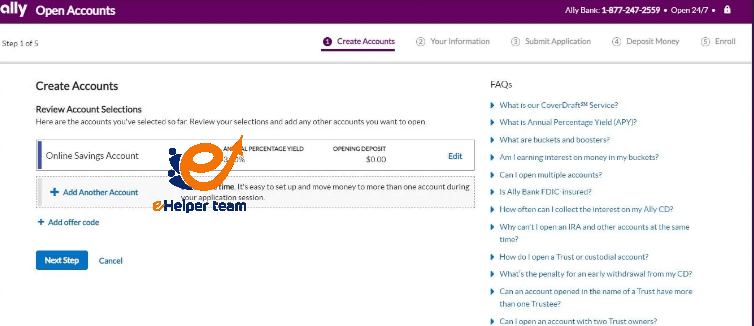
Let’s now walk through the process of how to open an Ally savings account step by step.
- Visit Ally’s Official Website
Go to ally.com, click on “Banking”, then choose “Savings.”
Select “Open Account” under Online Savings.
- Fill Out the Application
You’ll enter your name, address, SSN, and contact details. This information is required to confirm your identity instantly.
- Choose How to Fund Your Account
Ally allows several funding methods:
Electronic transfer (ACH) from another bank
Mobile check deposit
Wire transfer
You can even start with $0 — there’s no minimum balance requirement.
- Review & Submit
Before you finalize, review all information carefully.
Once you submit, you’ll receive a confirmation email with your account details.
If you’d like a detailed illustration of each step with screenshots, check this visual guide on opening a savings account that breaks down the process in simple, picture-based steps.
Step 4: Managing Your Ally Online Savings Account
After successfully opening your account, you’ll get immediate access to Ally’s secure online portal. From there, you can log in and manage your money through the Ally Mobile App or website dashboard.
Here’s what you can do easily:
Set up automatic transfers to build savings
Track interest growth over time
Organize funds into savings buckets (for goals like “Vacation” or “Emergency”)
Use Zelle for quick money transfers
Ally’s platform offers flexibility and control, making digital savings management simple.
To discover how Ally compares with other platforms, see this resource about online savings accounts and understand what makes Ally unique in the digital banking industry.
Step 5: Tips to Maximize Your Savings
To get the most from your Ally savings account, consider these proven strategies:
Automate deposits — schedule recurring transfers from your main checking account.
Leverage “Buckets” — divide your money by goal (travel, home, emergency).
Monitor interest rates — Ally adjusts its APY regularly.
Enable alerts — set up text or email notifications for deposits and withdrawals.
Track your growth — review your monthly statements to stay on target.
These small adjustments help you save faster without extra effort.
Step 6: Common Problems & Simple Fixes
Even though Ally’s process is smooth, minor issues can occur
| Issue | Possible Cause | Solution |
|---|---|---|
| Identity verification failed | Mismatch in address or SSN | Double-check your details and re-upload documents |
| Funding delay | Bank transfer pending | Wait 1–3 business days |
| Login issues | Two-factor authentication error | Reset credentials via email |
| Missing verification email | Filtered as spam | Check spam folder or request a new link |
Step 7: Advanced Tools and Automation Features
Once you’ve learned how to open an Ally savings account, it’s time to make the most of it. Ally isn’t just another online bank — it’s built with automation that helps you save smarter.
Here are the top advanced features worth using:
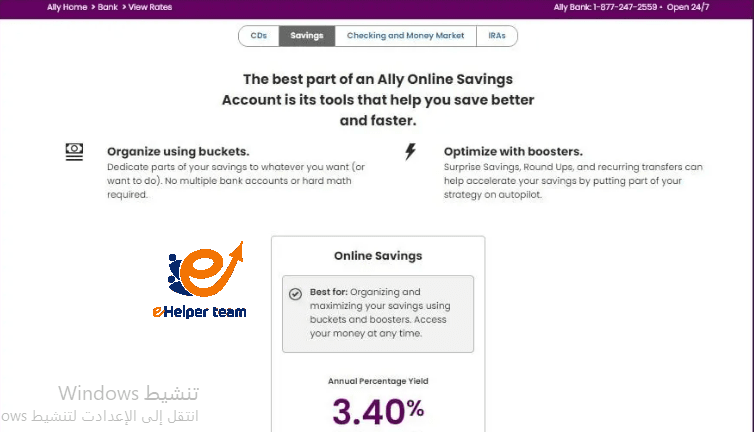
- Ally “Buckets”
This feature lets you divide your savings into categories (or buckets) — for example, vacation, emergency fund, and new car.
Each bucket grows with the same interest rate but keeps your goals visually separated. It’s a powerful way to stay organized.
- “Surprise Savings”
A standout feature that analyzes your checking account spending and automatically moves small amounts into your savings when it detects surplus funds.
You don’t need to lift a finger — the system saves intelligently for you.
Automatic Transfers
You can schedule recurring transfers weekly or monthly, ensuring you build savings consistency over time.
To see how other financial platforms implement similar automation, check out this helpful article on digital savings tools. It gives a solid comparison between Ally and other leading banks.
Step 8: Keeping Your Ally Account Secure
Security is one of Ally Bank’s top priorities. When you’re managing money online, protecting your account from cyber risks is essential.
Here’s what Ally does — and what you should do — to stay safe:
Ally’s Built-In Security:
Two-Factor Authentication (2FA): Adds an extra verification step before access.
SSL Encryption: All data transmitted is encrypted end-to-end.
Fraud Monitoring: Real-time alerts for suspicious activity.
FDIC Insurance: Your money is insured up to $250,000.
What You Should Do:
Never share login credentials or PINs.
Always log in via the official Ally.com domain.
Avoid public Wi-Fi when making transactions.
Update your password regularly.
If you’re comparing Ally with other secure travel accounts, you might find this analysis on travel bank accounts useful for international banking safety tips.
Step 9: Comparing Ally Bank to Other Online Savings Accounts
Many people who search for how to open an Ally savings account are also curious about how it compares with competitors like Discover Bank, Capital One 360, or Marcus by Goldman Sachs.
Here’s a quick comparison table for clarity:
| Feature | Ally Bank | Discover Bank | Marcus by Goldman Sachs |
|---|---|---|---|
| Minimum Balance | $0 | $0 | $0 |
| Monthly Fees | None | None | None |
| APY (2025 avg.) | 4.25% | 4.15% | 4.20% |
| Mobile App Rating | 4.8★ | 4.7★ | 4.6★ |
| FDIC Insurance | Yes | Yes | Yes |
Step 10: Why Choose Ally Bank for 2025 and Beyond
By now, you know exactly how to open an Ally savings account, but the real value lies in what happens after you open it.
Ally continuously updates its technology to offer better automation, faster transfers, and smarter tools for personal finance.
Key Reasons to Stick with Ally:
Continuous APY updates aligned with market trends
Excellent mobile experience
No hidden fees — ever
Simple setup that even beginners can manage
Trusted by millions of U.S. users
If you’re building long-term savings goals, Ally provides the perfect digital foundation to grow your wealth safely and efficiently.
Frequently Asked Questions (FAQs)
1. How long does it take to open an Ally savings account?
Usually, the process takes less than 10 minutes online. Identity verification and account activation are often instant.
2. Is there a minimum deposit required to open an Ally savings account?
No. You can open it with $0, and start adding funds whenever you like.
3. Does Ally charge monthly maintenance fees?
No. Ally is 100% fee-free for savings accounts, making it one of the best digital options.
4. Can I open an Ally account from outside the U.S.?
Unfortunately, Ally Bank is limited to U.S. citizens and permanent residents. For international users, see travel bank accounts for suitable alternatives.
5. What documents do I need to open an Ally savings account?
You’ll need:
A valid photo ID
Social Security Number (SSN)
U.S. address
Existing bank details (for funding)
6. How can I transfer money into my Ally account?
You can use:
ACH transfer from another bank
Mobile check deposit
Wire transfer
7. Is Ally Bank safe for online savings?
Yes. It uses two-factor authentication, encryption, and fraud monitoring to protect all customers.
8. Does Ally Bank offer joint savings accounts?
Yes, you can open a joint account easily during the setup process by adding a co-owner.
9. How often does Ally update its APY?
Ally adjusts its interest rates frequently, based on the Federal Reserve and market trends.
10. Is Ally better than other online banks?
For most users, yes. Ally combines high APY, zero fees, and an excellent digital interface.
To explore comparisons, visit this detailed article about best online banks.
Conclusion
Learning how to open an Ally savings account in 2025 gives you access to one of the most reliable, transparent, and rewarding digital banking platforms available.
With its high APY, no-fee policy, and strong security features, Ally makes it easy for anyone to take control of their finances from anywhere, anytime.
Whether you’re saving for a dream vacation, an emergency fund, or a long-term goal — Ally’s technology-driven approach helps you grow your money smarter and faster.